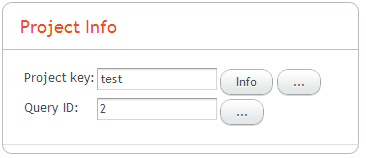
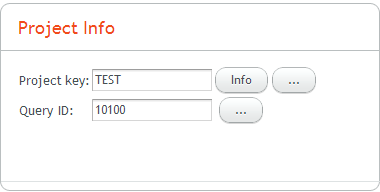
The buttons in Grid Layout are shown below the text areas. How do I align them to be on the same level?
I see the grid row’s height is 28 px, while the text area height is 22, so that’s why the text area is shown at the top of the row (or buttons seem to be shown at the bottom)
Here’s the code
    public class ProjectPanel extends Panel ...

    private static final String TEXT_AREA_WIDTH = "120px";

    private void buildUI() {
        GridLayout grid = new GridLayout(4, 2);
        addComponent(grid);

        grid.setSpacing(true);

        projectKeyLabel = new Label("Project key:");
        grid.addComponent(projectKeyLabel);

        projectKey = new TextField();
        projectKey.setPropertyDataSource(projectKeyProperty);
        grid.addComponent(projectKey);
        projectKey.setWidth(TEXT_AREA_WIDTH);

        Button infoButton = EditorUtil.createButton(...   );
        infoButton.setEnabled(projectInfoCallback != null);
        grid.addComponent(infoButton);

        Button showProjectsButton = EditorUtil.createLookupButton(...   );
        showProjectsButton.setEnabled(projectProvider != null);
        grid.addComponent(showProjectsButton);

        if (queryValueProperty != null) {
            queryValueLabel = new Label("Query ID:");
            grid.addComponent(queryValueLabel);
            queryValue = new TextField();
            grid.addComponent(queryValue);
            queryValue.setWidth(TEXT_AREA_WIDTH);
            queryValue.setPropertyDataSource(queryValueProperty);

            Button showQueriesButton = EditorUtil.createLookupButton(....   );

            setQueryLabels();
            showQueriesButton.setEnabled(queryProvider != null);
            grid.addComponent(showQueriesButton);
        }
    }