I’m looking for advice on how to efficiently get help from LLM coding agents when debugging UI issues in Vaadin. I run into situations where I can clearly see a problem on screen (e.g., text overflowing its container), but I’m unsure how to communicate that visual issue back to the LLM in a way that maps to the right code.
Main question: What’s the best way to bridge the gap between “what I see on screen” and “the code responsible for it”? Should I:
Take a screenshot and paste it into the LLM chat?
Inspect the element in DevTools and grab a specific component ID or class name?
Something else entirely?
A secondary question: To work best with Vaadin Copilot, do you recommend doing all styling in Java, or is it better to keep styles in styles.css?
Any tips or workflows that have worked well for you would be greatly appreciated!
I recommend trying things out and seeing what works for you. Different models and different projects will behave different. Anything can work. I’ve used screenshots, vague or detailed textual descriptions of the issues, Playwright MCP, Playwright CLI, Chrome Dev Tools MCP, etc. There are new capabilities, new tools and new integrations coming out frequently so I don’t want to be too prescriptive about it.
About screenshot, it depends a lot about what is wrong. Visual LLM are quite good at functional score but bad at visual score.
For example, it will “see” the different fields and how they are organized but they will be able to ignore a missing border or a text in black instead of white.
Hey, good question! Improving workflows when you are working with coding agents is exactly a topic we’re working on ATM.
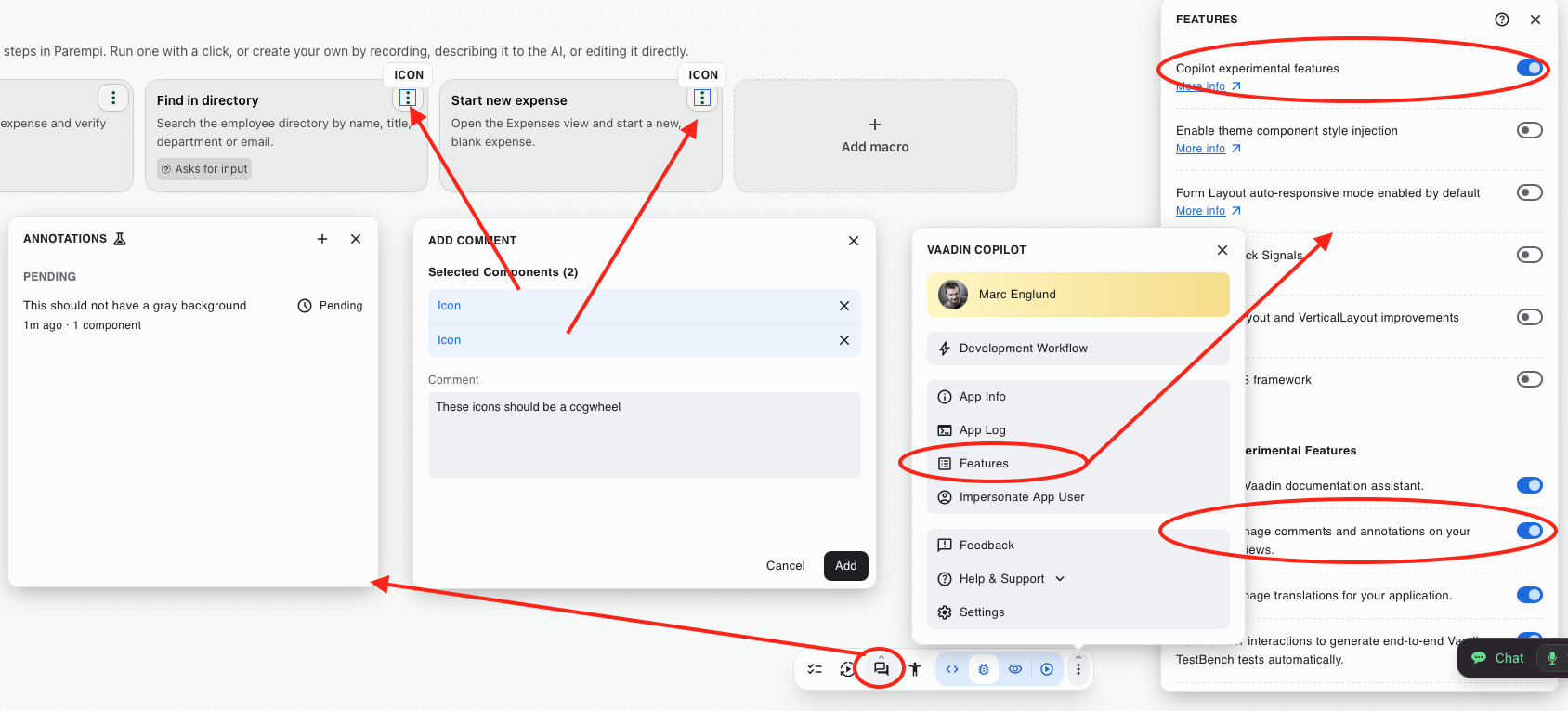
Right now, you should try the UI Annotations feature in Vaadin Copilot:
Enable Copilot Experimental Features and the anotations feature (feature flags)
Switch Copilot to “TestMode”, open the “Annotations” panel
“Add comment” and select 0…N components related to your comment
…you can add multiple annotations
When done, tell your agent to fix the comments in vaadin-copilot-comments.json
(Copilot puts references to source locations in the json along with your comment/request, which should help the agent figure out what you’re talking about with minimal explanation regarding which view, which button etc.)
Just to add some more, some things we’re experimenting with:
Ability to “push” annotation to the coding agent form Copilot; this is possible ATM, but requires “channels” in Claude Code, so we’re experimenting some other options, including integrating with the brand new dev loop daemon.
Giving the agent some instructions how to deal with the annotations would be great; again there are several possibilities, but we’re still figuring out which workflows will make the most sense. This agenting coding thing is a bit of a moving target ;-)
We realize it would be convenient to be able to draw on the UI when you add annotations, e.g. if you want to point to an empty area. We have a prototype of this, but it then requires a screenshot or some “free form” representation of the UI + elements your annotation added. We’re still thinking about this.
Again:
We’re very interested in hearing how people work with coding agents, what the painpoints are, so that we can figure out if there is something were we can actually fill in the gap.
Think of it like writing UI tests - that’s what Playwright is originally made for. It also does screenshots, but with a screenshot it’s up for the model to understand what is going on there. Is there a label you can identify? A specific element type, a content string? Test it out and you’ll see how it works with your setup.
Hey @Marc , Just coming back to say that I am really enjoying this way of working, and it does seem to bridge the gap, allowing me to essentially point at things in the UI and ask the LLM to make changes there. The main annoying issue that I keep running into is that after the LLM makes changes to the code, of the Comment always changes from pending to outdated. So then I need to typically go through and click on all of them to switch them back to pending and then done. So I’m not sure why that’s happening, but I guess the code is changing enough that the annotations truly are outdated. But I would say that’s the biggest friction point.