I downloaded a fresh project using start.vaadin.com and vaadin version is v23.2.3. I see the menu creation is changed from RouterLink to AppNavItem. The problem now is, when I hover my cursor on the AppNavItem, it does not change to hand cursor. It still shows with Arrow mark which confuses whether this is a link or not. Is this the expected behavior or am I missing anything here?
Should I change this is to RouterLiunk as the workaround ?
Just use css
Expected behavior, but easily configurable:
vcf-nav {
  --lumo-clickable-cursor: pointer;
}
Thanks. It worked
Would it be possible to get the same effect for a row in the CRUD component?
You can change the cursor on anything you want with css
Yes, you would think so.
On a crud grid, the components that make up the rows look like this:
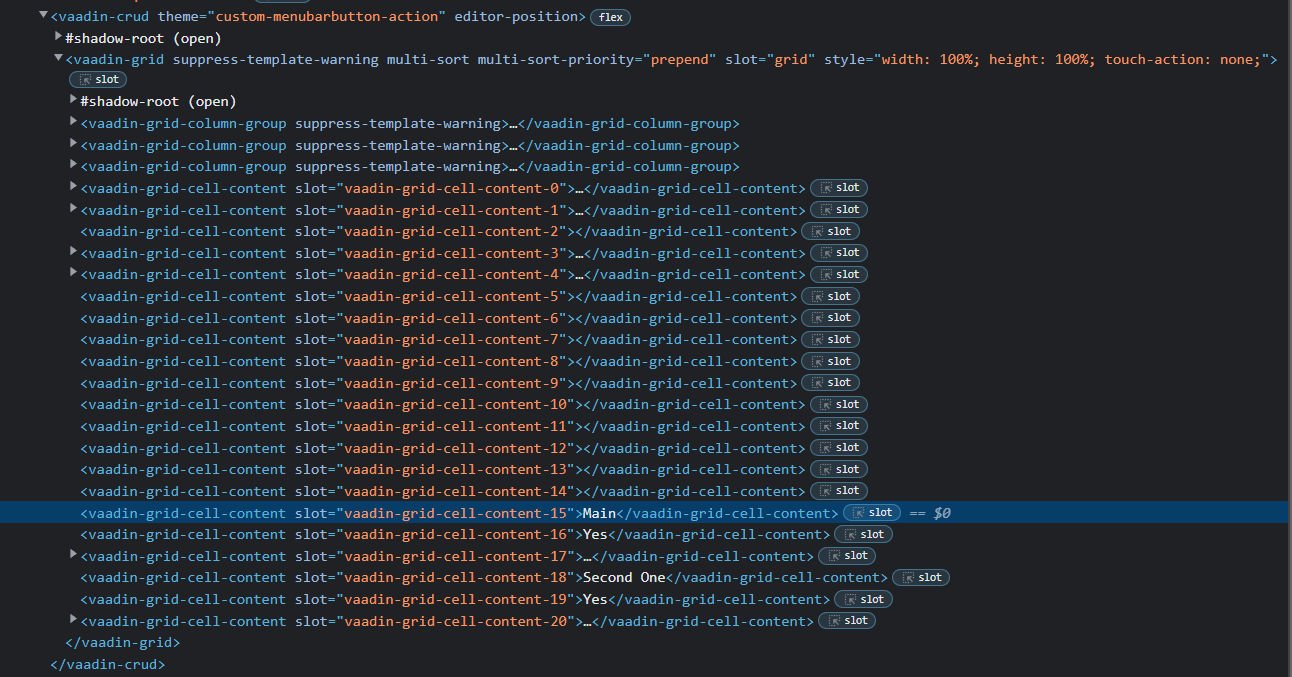
Some of those are cells in a row belonging to a column.
The CSS to only pick those up would be very interesting to see indeed…
I don’t have time to dig through it but you can use https://cookbook.vaadin.com/grid-dense-theme as starting point
part cell is probably the one you need
Thats a grid, not a crud, which is something else completely
The styling mechanism works the same
Thats what I am saying. In a crud, there are no cells and no rows in the DOM. It is made up of these vaadin-grid-cell-content components that are ambiguous about what is a piece of data in a row, or a heading, or a filter, or a sort…
This might be the answer
But in a CRUD
The same applies to the grid tho  but good you found something to start with
Yes, I am sorry. You are correct. They are the same.
CSS in Vaadin is driving me crazy.
Would you happen to be interested in a small paid training session with me to go over some Vaadin CSS basics?