Chapter 2. Architecture
Table of Contents
In Chapter 1, Introduction, we gave the general architecture of IT Mill Toolkit. Let us now look deeper into it. Figure 2.1, “IT Mill Toolkit Architecture” below illustrates the architecture.
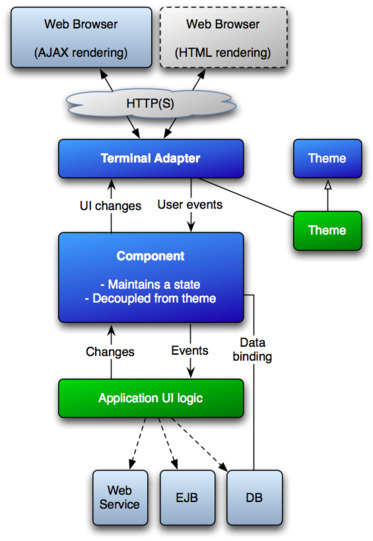
IT Mill Toolkit consists of an web application API, a horde of user interface components, themes for controlling the appearance, and a data model that allows binding the user interface components directly to data. Behind the curtains it also employs terminal adapters to receive requests from web browser and make responses by rendering the pages using the appropriate theme and rendering mode.
An application using IT Mill Toolkit runs as servlet in a Java web server, serving HTTP requests. The terminal adapter receives client requests through the web server's Java Servlet API, and inteprets them to user events for a particular session. An event is associated with a UI component and delivered to the application. As the application logic makes changes to the UI components, the terminal adapter renders them in the web browser by generating a response. In AJAX rendering mode, a client-side JavaScript component receives the responses and uses them to make any necessary changes to the page in the browser.
The top level of a user application consists of an application class that
inherits com.itmill.toolkit.Application. It creates
various UI components (see below) it needs, receives events regarding them,
and makes necessary changes to the components. For detailed information about
inheriting the Application, see Chapter 3, Writing a Web Application.
The major parts of the architecture and their function are as follows:
- User Interface Components
-
The user interface consists of UI components that are created and laid out by the application. The components render themselves using a terminal adapter, which in return creates user events (see below) for the components. The components relay these events to the application logic. Most components are bound to some data using the Data Model (see below). For a complete description of UI component architecture, see Chapter 4, User Interface Components.
- Terminal Adapter
-
The UI components do not render themselves directly as a web page, but use a Terminal Adapter. This layer allows users to use IT Mill Toolkit applications with practically any web browser. Some older or simpler browsers may not support all the JavaScript features necessary to use AJAX for server communications. The Toolkit offers two terminal adapters: one for AJAX-enabled browsers and a plain HTML adapter for legacy browsers. You could imagine some other browser technology, not even based on HTML, and you - or we for that matter - could make it work just by writing a new adapter. Your application would still just see the Toolkit API. To allow for this sort of abstraction, UI components communicate their changes to the Terminal Adapter, which renders them for the user's browser. When user does something to the web page, the events are communicated to the terminal adapter through the web server either as asynchronous requests (AJAX adapter) or as normal page requests (HTML adapter). The terminal adapter delivers the user events to the UI components, which deliver them to the application's UI logic.
- Themes
-
The user interface separates between presentation and logic. While the UI logic is handled as Java code, the presentation is defined in themes as HTML, CSS, and JavaScript. IT Mill Toolkit provides a set of basic themes, and the application can use these themes by inheritance. Themes are discussed in detail in Chapter 6, Themes.
- UIDL
-
The terminal adapter communicates changes in the user interface components to the web page using a special XML-based User Interface Definition Language.
- Events
-
User interaction with UI components creates events, which are first processed on the client side with JavaScript and then passed all the way through the HTTP server, terminal adapter, and user component layers to the application.
- Data Model
-
In addition to the user interface model, IT Mill Toolkit provides a data model for interfacing data presented in UI components. Using the data model, the user interface components can update the application data directly, without need for any control code. All the UI components use this data model internally, but they can be bound to a separate data source as well. For example, you can bind a table component to an SQL query response. For a complete overview of the IT Mill Toolkit Data Model, please refer to Chapter 7, Data Model.