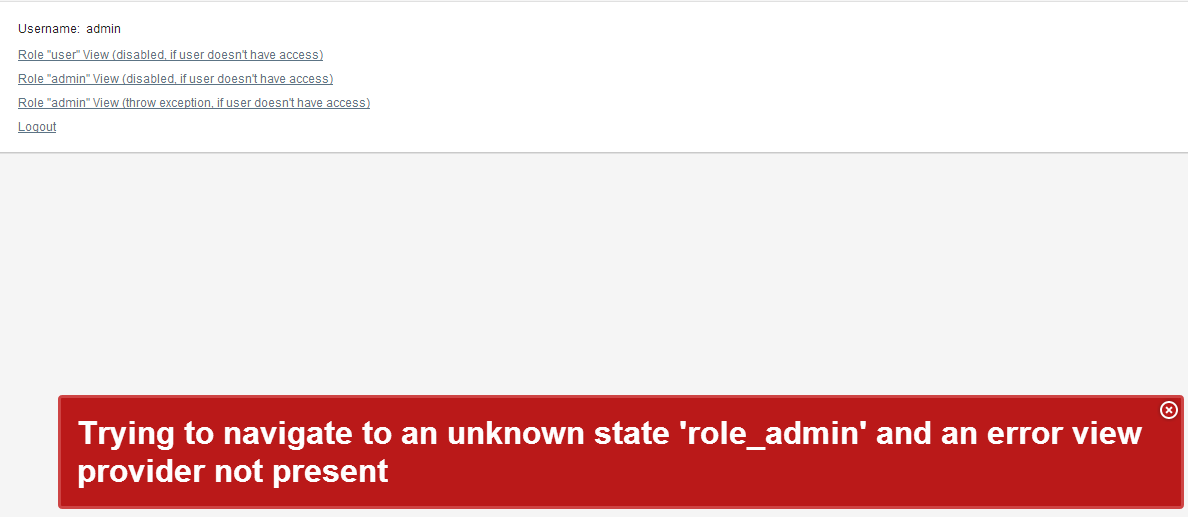
Thanks for keeping us update . i have just tried the sample with shiro integration, and i noticed a strange behaviour .
git clone git://github.com/xpoft/vaadin-samples.git vaadin-samples
cd apache-shiro
mvn jetty:run
for example when i login with the admin user , in my understanding i should be able to navigate to << Role “admin” View (disabled, if user doesn’t have access)>>
but in my case instead of getting the RoleAdminView i just get the Error message as if the admin user was not allowed to see the RoleAdminView.
Regarding your question on permission, i guess if someone need to have a more fine grain control on permission for more complexe application with no trivial enterprise organisation then maybe Yes a need @RequiresPermission will surely surface .
I Don’t know but maybe it has something to do with the cachedView, because it only happens when i first login as normal user then i logout . Then if try to login as admin user i can’t no more Access the privilège View , RoleAdminView. it throw me the same error message as if i signed in as “user” role.
I believe the problem is at line 115 in the DiscoveryNavigator:
String[] beanNames = SpringApplicationContext.getApplicationContext().getBeanNamesForType(viewClass);
        if (beanNames.length != 0)
        {
            throw new IllegalArgumentException("cant't resolve bean name for class :" + viewClass.getName());
        }
I upgrade spring-vaadin-integration to version 1.6.5 with vaadin 7.0.0.beta10
I update and test spring-security demo from vaadin-samples but after login ok, vaadin say this message “Failed to load the bootstrap javascript: ./VAADIN/vaadinBootstrap.js”
before version run perfectly.
What is the error?
I found that your spring integration implementation registers its own SpringUiProvider which uses the Spring bean name. This seems to prevent the functionality of returning different views to different clients. One work around I was thinking of would be to map two different servlets such as /app and /mobile and then use a servlet filter to redirect the user appropriately. That would let me configure two different bean names in the different servlets.
However it would be nice if I could use the native UIProvider functionality or have a hook in the SpringUiProvider to dynamically return a bean name. Maybe the “beanName” parameter should be replaced with a “beanNameProvider” parameter that must implement an interface similar to UIProvider but returns a bean name instead of a class.
I’m new to Vaadin and I have started working with Vaadin 7 and your Spring Addon and it is realy easy to use. Big thanks for that.
I thought about using Google Appengine for hosting my application and I found out that Vaadin offers a special Servlet for the GAE.
Is it possible that you offer another “springyfied” GAE-Servlet in your addon?
If by “no web.xml” you mean running with embedded Jetty, here’s the code snippet that works for me:
    ServletHolder appLoader = new ServletHolder(new ru.xpoft.vaadin.SpringVaadinServlet());
    appLoader.setInitParameter("beanName", "MyUI");
    appLoader.setInitParameter("widgetset", "MyWidgetSet");
The application starts up fine, I use Spring’s @Component and @Autowired everywhere and it works fine.
The app also finds the widget set fine (I can see my icons).
The problem I have is with not seeing the new (7.0) themes, but that’s an entirely separate problem and has nothing to do with your question.