What platform are you on btw?
On Mac, that usually resolves to ‘SF NS’, i.e. the San Fransisco font that comes with the OS.
On Windows, it usually resolves to Segoe UI, which comes with that OS.
On Linux, I suppose it depends on the distro.
I think the docs on vaadin.com load Roboto so that that is always used there. So it’s normal that the actual rendered font varies between that and locally running apps. What is strange that it would pick a font that doesn’t seem to have a 500-weight variant available.
(You could try overriding the family stack to a specific font, so you could for example do
body {
  --lumo-font-family: Roboto;
}```
And of course then also make sure Roboto is available.)Did you by any chance modify any of the styles through the Theme tab in start.vaadin.com by the way?
I am using Ubuntu 22.04.3 LTS .
I do not remember modifying the styles in the theme tab, though it’s possible as it’s a couple of months ago. But then i would find some of these settings back in the generated starter, and at least in the frontend/themes section there is nothing font related that i can see.
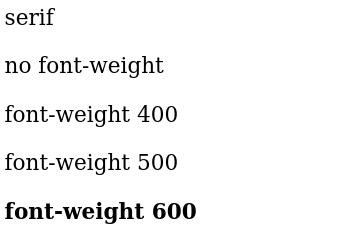
I created a small test html to see the default settings, and its effect on the font-weight:
<html>
    <body>
    <p id="defaultFont"></p>
    <script>
        document.getElementById('defaultFont').innerText = getComputedStyle(document.body).fontFamily;
        </script>
    <span>no font-weight</span>
    <p>
    <span style="font-weight: 400;">font-weight 400</span>
    <p>
    <span style="font-weight: 500;">font-weight 500</span>
    <p>
    <span style="font-weight: 600;">font-weight 600</span>
    </body>
</html>
It seems that the default font needs at least font-weight 600 to see things as “bold”
Interestingly enough, when i inspect the text on that page it uses DejaVu Serif for everything but font-weight 600 there it uses DejaVu Serif DejaVu Serif Bold
welp, then it’s a font issue – it just doesn’t have the 500 weight (which is pretty unusual these days imo, but  )
)
So you could either change the font used by the app to something that does, or you can change the weight of those header cells to 600 like this:
  font-weight: 600;
}```Thanks, it’s an interesting discussion  I could change the font-weight but that would then get bolder for other platforms.
On the typography page https://vaadin.com/docs/latest/styling/lumo/lumo-style-properties/typography it says that Arial and Helvetica are chosen for ‘other’ platforms, but neither of those fonts are out of the box installed on most Linux distros. Anyway, i will leave it as it is. At least i am aware of such rendering issues and if users complain will know where to look. Many thanks for your thoughts !
Vaadin’s fontstack is close to the one defined by Bootstrap, there you can find more reasoning and further readings if you are interested in this topic https://getbootstrap.com/docs/5.0/content/reboot/#native-font-stack