I’ve reverted back to .9.3v7, but kept Vaadin .10 and everything works just fine. I don’t know what code could I paste, especially that it works on previous version and my table code is very simple. If you have something particular in mind, I’ll be glad to provide you with those information.
first you could run your application in debug mode, add the ?debug parameter into the URL and check that all three versions shown in the debug window’s information tab match.
For the code, I mean something like a test case - how you initialize your table and how you fill it etc.
Did you mean versions in General information tab? If so, they do match (7.1.10).
As for code:
final FilterTable table = new FilterTable();
table.setSelectable(true).
table.setSizeFull();
table.setColumnCollapsingAllowed(true);
table.setFilterBarVisible(true);
And setting data:
public void setupTableData(Container.Sortable container) {
	container.sort(new Object[]{ORDER_DATE}, new boolean[]
{false});

	table.setContainerDataSource(container, Lists.newArrayList(FIELDS..., ORDER_DATE));
	table.setColumnHeaders(Fields..., "Date");
}
I’m using your add-on and facing an issue : when i have an Enum preperty in my table, the generated combo allow the null selction and when i select the blank choice in the combo, the combo button display this error :
Caused by: java.lang.NullPointerException
at com.vaadin.data.util.filter.Compare.equals(Compare.java:287)
at org.tepi.filtertable.FilterFieldGenerator$2.valueChange(FilterFieldGenerator.java:446)
at sun.reflect.NativeMethodAccessorImpl.invoke0(Native Method)
at sun.reflect.NativeMethodAccessorImpl.invoke(NativeMethodAccessorImpl.java:39)
at sun.reflect.DelegatingMethodAccessorImpl.invoke(DelegatingMethodAccessorImpl.java:25)
at java.lang.reflect.Method.invoke(Method.java:597)
at com.vaadin.event.ListenerMethod.receiveEvent(ListenerMethod.java:510)
… 147 more
I don’t understand if there is a problem with my enum, or if i should (if it is possble) disable the null selection…
Could you help me please ?
Sorry for the delay… I’m using the 0.9.1 version of the addon, with vaadin 6.8.13. I just took the “vaadin 6+ compatible” version.
I’m using vaadin 6.8.13 on liferay 6.1.1 ga2 to make some portlets, and I didn’t take some time to look if i could only upgrade vaadin from 6 to 7 without issues on my liferay version…
Hi,
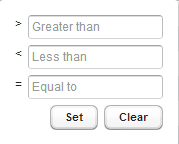
I attach an image. How can I change language of those inscriptions? I have defined getClearCaption() and getSetCaption() method in FilterDecorator. It works fine only for date filter.
Please find a post from Tomas Zuklys from 01/02/2014 in this thread. He wrote about similar problem there and also he wrote down how to correct line 471 in FilterFieldGenerator.java field to solve the problem.
I don’t know if corrupted method can be overriden or if you have to change the source file. And I am even not sure if it solves your problem since I don’t want to dig deeply in it, but I hope it could help.
By the way, on the online demo
v6 there is a “Show all” choice in combos that i don’t find in any of the tree code samples (in the highlight section of the add-on page) Can you (or Teppo) tell me how to do this ? I think it is just what i need…
Edit : Ok this is not my solution : The “Show all” is the the text to display on the null selection choice, and on the v6 online demo the null selection (show all) actualy works so Teppo please tell us ur secret
I’m seeing strange behavior when selecting multiple rows with a filter enabled. If I click the first row, then scroll down and shift-click the last row, then scroll back up, not all the rows are selected. I thought setPageSize(0) might help with this but it appears not to.
I’m using the 9.1 version with the 6.8.13 version of vaadin. There is a defect in the NumberFilterPopup. After the filter is set, if the ‘Clear’ button is clicked, a null pointer exception is thrown. I’ve traced the error to the reset(), wherein the ‘interval’ variable is set to null and then subsequently used by the Compare.equals method without a null check. It looks like if the ‘possiblyExistingFilter’ variable (line 445 in FilterFieldGenerator) were not set, the compare that triggers the null exception will not be called. Interestingly enough, if the ‘Set’ button is clicked in this state, another null exception is thrown at the same place.
Also, non-numeric inputs are not handled gracefully - a NumberFormatException is thrown.
As a side issue, the buttons are not cleared of the error notification icons even after valid values are input.
Aside from these minor issues, the addon works amazingly! Thanks!
This addon made my work ease. I am just wondering if there is any way to display Time picker as well in the Date filter right below the column header, so that to filter based on time. I think someone already raised this question. Below is snippet of code which displays Date popup filter.
I test the new version for Vaadin 7 (vaadin 7.1.11 and filteringtalbe 0.9.4.v7). It is very good
I have just one bug in Internet explorer (IE 8):
I have my table with table.setColumnCollapsingAllowed(true);
Some fields are set with table.setColumnCollapsed(“aField”, true);
I filter a column and then I reset all filters with table.resetFilters();
In this case columns are not well realigned under the headers (If all collapsing field are visible in the table, the reset filter is OK and columns are well aligned)
Is it a bug or do I have to configure something?
Thanks in advance,
Julian
I also tested the new Version (Vaadin 7.1.11 and filteringtalbe 0.9.4.v7). Nice work - thanks for sharing with us.
My workmate and me found two bugs:
PagedFilterTable.class:200 - The listener to enable/disable the controls for paging is correct, but there is no initial enable/disable for the next/previous buttons before the listener takes effect.
You use the method getPageLength() from CustomTable:class - In our scenario we set the PageLength with the ComboBox of your controls, but the PageLength is being overwritten by CustomTable with the value of visible items. So in a maximized window PageLength is 34. By scaling the window down getPageLength() returns a smaller value.
I would appriciate, if there is a possibility in a further release to change the control captions for the previous/next Button and the items in the ComboBox.
i’m using the same Vaadin and FilteringTable versions and i’m facing the same problems, any solution to this ?
Edit : i managed to create custum filters for date, number, enum and boolean so the problem is solved
Hi Everybody,
I have a general Problem with this great tool.
I want to render a cell as an image. theis works, but on this image the “row select” doesn´t work.
So I renderd this column as button with stylename(BaseTheme.BUTTON_LINK).
now i could listen on a click event on this button.
But now, how to give this event as “row select” to the table.
Hi, Teppo!
First of all big thanks for such excelent plugin. It works great in my tasks. But I found a bug. Something wrong happens when i use plugin with huge amount of rows (>80000). In IE i can’t scroll to last row. When i trying to drag scrollbar to the end, it holds for a moment, showing busy indicator, and then jumps back to ~77000 row. In FF and chrome all works great, only IE. You can see this problem in Demo if you set row count to 90000. Thanks.
i have a question, I’m using the 9.1 version with the 6.8.13 version of vaadin, when applying a filter, the result table keep the same numbr of pages, and if i understood, it apply the filter for every page of the table and doen’t reorder the pages, for exemple, if the second page contain a row that sweets the filter entered, you have to go to the second page to see it even if the fisrt page has no rows displayed, so my question is, is there a work around to let the filtering engine reset the container pages with the result independently from the fist pagination configuration ?
Please see the method org.tepi.filtertable.FilterDecorator.getNumberFilterPopupConfig() and provide the captions for those buttons (and the prompts) within a NumberFilterPopupConfig instance.
I agree it’s a bit counter-intuitive that the ways to set the captions are so different - the reason is that the number filter was an external contribution and I’ve not had the time to unify the APIs.
 Can you (or Teppo) tell me how to do this ? I think it is just what i need…

