How to fix the number of columns of the form?
I want to have 3 columns to edit/create my bean.
Thanks,
If Vaadin 8, use a GridLayoutCrudFormFactory. You can specify the number of columns and rows in the constructor. If Vaadin 10+, use the constructor of DefaultCrudFormFactory to specify ResponsiveSteps.
Gianluigi Ferraris:
Another question:
should be possible to visually group some of the formfactory fields together ?
In that case , what do you suggest to achieve it , by css, components …
Thank you.
This is not currently supported by the add-on. One way is to extend AbstractCrudFormFactory to create any composition you wish.
For one of my requirement, in the CRUD Form Layout I have a couple ComboBoxProviders added and few text boxes. As per the requirement while selecting a value from the one of the ComboBox I wish to disable 2 text fields and if the value again is changed for the combo box I need to again enable the text boxes.
I tried the following code with component ComboBox instead of the ComboBoxProvider:
gridData.getCrudFormFactory().setFieldProvider(WebGuiConstants.REPAY_DEDUCTION_TYPE_FLD, () -> {
			ComboBox<AdvanceDeductionType> comboBox = new ComboBox<>(WebGuiConstants.REPAY_DEDUCTION_TYPE_FLD,
					Arrays.asList(AdvanceDeductionType.values()));
			comboBox.addValueChangeListener(event -> {
				if (event.getSource().isEmpty()) {
					gridData.getCrudFormFactory().setDisabledProperties("");
					return;
				} else
					switch (event.getValue()) {
					case EMI:
						gridData.getCrudFormFactory().setDisabledProperties("");
						break;
					case ONETIME:
						gridData.getCrudFormFactory().setDisabledProperties("repayDeductionTerm",
								"fixedDeductionAmount");
						break;

					}
			});
			return comboBox;
		});
Please help me with sample code for the same.
Unfortunatelly, there’s not good API to achive this. Maybe you can try something like this, but I’m not sure if this would work well:
For one of my requirement, in the CRUD Form Layout I have a couple ComboBoxProviders added and few text boxes. As per the requirement while selecting a value from the one of the ComboBox I wish to disable 2 text fields and if the value again is changed for the combo box I need to again enable the text boxes.
I tried the following code with component ComboBox instead of the ComboBoxProvider:
gridData.getCrudFormFactory().setFieldProvider(WebGuiConstants.REPAY_DEDUCTION_TYPE_FLD, () -> {
			ComboBox<AdvanceDeductionType> comboBox = new ComboBox<>(WebGuiConstants.REPAY_DEDUCTION_TYPE_FLD,
					Arrays.asList(AdvanceDeductionType.values()));
			comboBox.addValueChangeListener(event -> {
				if (event.getSource().isEmpty()) {
					gridData.getCrudFormFactory().setDisabledProperties("");
					return;
				} else
					switch (event.getValue()) {
					case EMI:
						gridData.getCrudFormFactory().setDisabledProperties("");
						break;
					case ONETIME:
						gridData.getCrudFormFactory().setDisabledProperties("repayDeductionTerm",
								"fixedDeductionAmount");
						break;

					}
			});
			return comboBox;
		});
Please help me with sample code for the same.
Unfortunatelly, there’s not good API to achive this. Maybe you can try something like this, but I’m not sure if this would work well:
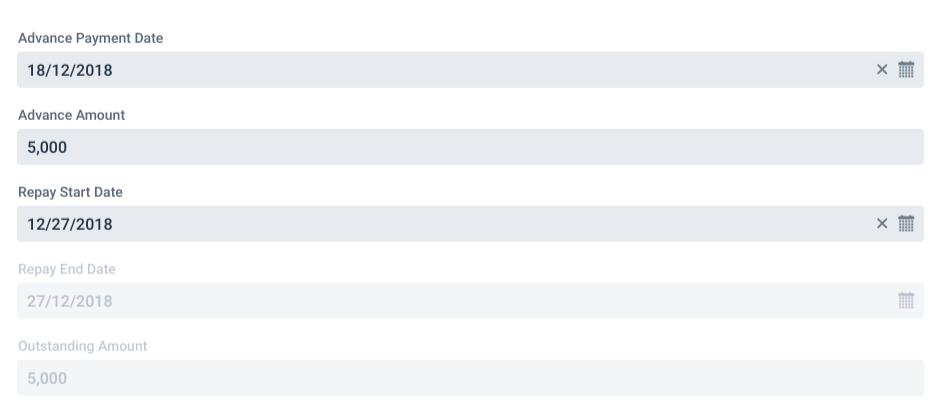
The above code changed seems to be working fine. Thanks for the help. But there is one small problem, the DatePicker component which I have set using setFieldProvider() shows the date format at some instant it shows dd/mm/yyyy and later it displays mm/dd/yyyy, whereas there is another DatePicker field which is added with DefaultFieldProvider shows the date format as dd/mm/yyyy always. I would like have it consistent as dd/mm/yyyy for all the DatePicker fields. I tried setting Locale to Default and UK but still the problem persists. I have attached screenshot.
Лешик ツ:
Is it possible to programmatically bring up the table row editing window?
I’m affraid there’s no public API for that. Check the GridCrud::addButtonClicked() method and see if you can extend the class and try to expose that method somehow. I haven’t tried this though.
Adexe Rivera Martín:
where is the best way, if exist, to convert price fields with currency converter??
If you mean Vaadin’s Converter, currently there’s no API for it in the component. As an alternative, you can create your own CrudFormFactory implementation. If you mean Java’s CurrencyStringConverter you can encapsulate any kind of logic in a custom field.
Adexe Rivera Martín:
where is the best way, if exist, to convert price fields with currency converter??
If you mean Vaadin’s Converter, currently there’s no API for it in the component. As an alternative, you can create your own CrudFormFactory implementation. If you mean Java’s CurrencyStringConverter you can encapsulate any kind of logic in a custom field.
I use Framework 8.6.4 and CrudUi 2.3.
Grid in Framework 8.6 →
Change the return type of Grid.asMultiSelect and Grid.asSingleSelect that has API to access the features of corresponding selection model.
Is this problem fixed?
Stefan Throm:
I use Framework 8.6.4 and CrudUi 2.3.
Grid in Framework 8.6 →
Change the return type of Grid.asMultiSelect and Grid.asSingleSelect that has API to access the features of corresponding selection model.
Is this problem fixed?
Caused by: java.lang.NoSuchMethodError: com.vaadin.ui.Grid.asSingleSelect()Lcom/vaadin/ui/SingleSelect;
at org.vaadin.crudui.crud.impl.GridCrud.updateButtons(GridCrud.java:128)
at org.vaadin.crudui.crud.impl.GridCrud.initLayout(GridCrud.java:89)
at org.vaadin.crudui.crud.impl.GridCrud.(GridCrud.java:60)
at org.vaadin.crudui.crud.impl.GridCrud.(GridCrud.java:43)
Caused by following command:
orgCrud = new GridCrud<>(Organisation.class, new HorizontalSplitCrudLayout());
Caused by: java.lang.NoSuchMethodError: com.vaadin.ui.Grid.asSingleSelect()Lcom/vaadin/ui/SingleSelect;
at org.vaadin.crudui.crud.impl.GridCrud.updateButtons(GridCrud.java:128)
at org.vaadin.crudui.crud.impl.GridCrud.initLayout(GridCrud.java:89)
at org.vaadin.crudui.crud.impl.GridCrud.(GridCrud.java:60)
at org.vaadin.crudui.crud.impl.GridCrud.(GridCrud.java:43)
Caused by following command:
orgCrud = new GridCrud<>(Organisation.class, new HorizontalSplitCrudLayout());
I am getting exactly the same error after updating to latest vaadin 8.7.
Is it possible to set a default value when opening the Dialog for new items? I tried the fieldCreationListener and fieldProvider-methods, but the value gets always overridden.
Is there a way to support crud of images by displaying a Upload and Image in the form? I tried to integrate the Upload but it doesn’t implement the required HasValueAndElement interface.
Caused by: java.lang.NoSuchMethodError: com.vaadin.ui.Grid.asSingleSelect()Lcom/vaadin/ui/SingleSelect;
at org.vaadin.crudui.crud.impl.GridCrud.updateButtons(GridCrud.java:128)
at org.vaadin.crudui.crud.impl.GridCrud.initLayout(GridCrud.java:89)
at org.vaadin.crudui.crud.impl.GridCrud.(GridCrud.java:60)
at org.vaadin.crudui.crud.impl.GridCrud.(GridCrud.java:43)
Caused by following command:
orgCrud = new GridCrud<>(Organisation.class, new HorizontalSplitCrudLayout());
This should be fixed in the latest versions of the add-on. Cheers!
Thomas Wagner:
Is it possible to set a default value when opening the Dialog for new items? I tried the fieldCreationListener and fieldProvider-methods, but the value gets always overridden.
Vaadin 10
Fixed. You should be able to use a FieldCreationListener to set the field value in v3.8.1. For example:
formFactory.setFieldCreationListener(CrudOperation.ADD, "name", f -> f.setValue("default name"));