Is this line correct: UI.getCurrent().getPage().executeJs(“register(window.warRequest”)
I am confused about the “(” right after register.
Are you sending the POST request from the server or from the JavaScript?
JavaScript
I must place somewhere the server url.
Then what I’ve been telling you is right
You only need to do one thing on the server: invoke a JavaScript function after a button is clicked.
The data is all available in the browser.
So what I did so far is correct?
Assuming you followed my instructions, yes
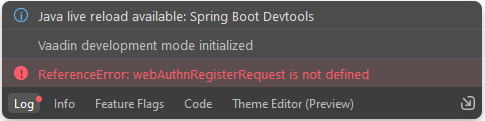
Running the code will result into this:
Maybe it helps if I show you the full code from Js file.
You can find it here: https://github.com/privacyidea/webauthn-client/blob/master/pi-webauthn.js
You need to define the webAuthnRegisterRequest in your JavaScript
I did that. You showed me that.
Then I recommend you put a breakpoint in your JavaScript code and see what happens. Hint: you can use the debugger; statement in JavaScript to do that.
There are possibly two wrong things:
- I put the defintion of webAuthnRegisterRequest in the wrong place.
- The line UI.getCurrent().getPage().executeJs(“register(window.warRequest”) is not correct.
At least you’re missing one ) from the second one, before the latter "
Added it but no result.
Can you show both your java and Js code? It seems to me you are not passing the parameter correctly