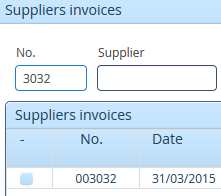
Create a filter line which filters your table, look at the pic.
Use this :
row.createCell(colIndex++).setCellValue(MyString);
An exemple of an excel export…
public static File exportStates(List invoices) {
    Workbook wb = new XSSFWorkbook();
    CreationHelper createHelper = wb.getCreationHelper();
    Sheet sheet = wb.createSheet("myFile");

    Row row = sheet.createRow(0);
    int colIndex = 0;

    row.createCell(colIndex++).setCellValue("My column 1");
    row.createCell(colIndex++).setCellValue("My column 2");
//ETC…
    int rowIndex = 1;
    CellStyle cellStyleDate = wb.createCellStyle();
    cellStyleDate.setDataFormat(createHelper.createDataFormat().getFormat("dd/mm/yyyy"));

    for (InvoiceQ icq : invoices) {
        if (icq != null) {
            row = sheet.createRow(rowIndex++);
            colIndex = 0;

             // HERE we set data to cells
            row.createCell(colIndex++).setCellValue(icq.getProject().getNumber());
            row.createCell(colIndex++).setCellValue(icq.getProject().getCode());
            if (icq.getExpectedDate() != null) {
                Cell cell = row.createCell(colIndex++);
                cell.setCellStyle(cellStyleDate);
                cell.setCellValue(icq.getExpectedDate());
            } else {
                row.createCell(colIndex++);
            }
          (.....)
    }

    //resize
    row.getCell(0).getSheet().autoSizeColumn(0);
    row.getCell(1).getSheet().autoSizeColumn(1);
    row.getCell(2).getSheet().autoSizeColumn(2);
   //etc...

    try {
        File file = File.createTempFile("myFile", ".xlsx");
        FileOutputStream fileOut = new FileOutputStream(file);
        wb.write(fileOut);
        fileOut.close();
        return file;
    } catch (Exception e) {
        log.error(null, e);
        throw new RuntimeException("Unexpected error while exporting myFile");
    }
}
Hi,
You can write customized code for exporting only selected rows.
What you can do is,
- Create object of HSSFWorkbook().
- Get number of columns.
- Create sheets.
- Fetch the header rows from Table.
- First Iterate the loop to create header columns in excel upto <= no. of columns.
- Fetch all table rows into workbook’s data rows.
- Iterate the loop upto <= table.size().
- Again take one for loop inside this loop fo iterating no. of columns.
And now you know how we can take values from table rows. Please refer above example to create excel file.
Regards,
Sagar
The export doesn’t works correctly when I use a SqlContainer with FreeformQuery and a custom FreeformStatementDelegate. The application goes in loop.
Example Code:
FreeformQuery q1 = new FreeformQuery("select * from table",connectionPool);
AdvancedQueryDelegate delegate=new AdvancedQueryDelegate(); //use for filter
q1.setDelegate(delegate); //uncommented this line,it works but i can't use sql filters!!!
SQLContainer sqlContainer = new SQLContainer(q1);
Table t=new Table();
t.setContainerDataSource(sqlContainer);
///
ExcelExport excelExport = new ExcelExport(t);
excelExport.export(); ///goes in infinite loop
AFTER A LOT OF TIME IN LOOP I GET THIS ERROR:
WARNING: Failed to fetch rows, rolling back
java.sql.SQLException: No active transaction
at com.vaadin.data.util.sqlcontainer.query.AbstractTransactionalQuery.commit(AbstractTransactionalQuery.java:72)
at com.vaadin.data.util.sqlcontainer.query.FreeformQuery.commit(FreeformQuery.java:361)
at com.vaadin.data.util.sqlcontainer.SQLContainer.getPage(SQLContainer.java:1377)
at com.vaadin.data.util.sqlcontainer.SQLContainer.updateOffsetAndCache(SQLContainer.java:1139)
at com.vaadin.data.util.sqlcontainer.SQLContainer.indexOfId(SQLContainer.java:674)
at com.vaadin.data.util.sqlcontainer.SQLContainer.getItem(SQLContainer.java:284)
at com.vaadin.data.util.sqlcontainer.SQLContainer.getContainerProperty(SQLContainer.java:257)
at com.vaadin.addon.tableexport.ExcelExport.getProperty(ExcelExport.java:627)
at com.vaadin.addon.tableexport.ExcelExport.addDataRow(ExcelExport.java:590)
at com.vaadin.addon.tableexport.ExcelExport.addDataRows(ExcelExport.java:541)
at com.vaadin.addon.tableexport.ExcelExport.convertTable(ExcelExport.java:348)
at com.vaadin.addon.tableexport.TableExport.export(TableExport.java:67)
at com.lucana.sigeosh.charts.AdvancedTable$5.menuSelected(AdvancedTable.java:301)
at com.vaadin.ui.MenuBar.changeVariables(MenuBar.java:191)
HI everyone,
can anyone please post an example of the code for a tableexport button click for a filteringtable. I am not fully understanding how to implement this.
Use the file FTableHolder.java attached to this post, then:
FilterTable filteringtable = new FilterTable();
ExcelExport excelExport = new ExcelExport(new Table()); //the constructor can’t be null so i use a “fake” deafult table
excelExport.setTableHolder(new FTableHolder(filteringtable)); //workaround with FTableHolder
excelExport.excludeCollapsedColumns();
excelExport.setReportTitle(“Report Title”);
excelExport.setExportFileName(“report.xls”);
excelExport.export();
19132.java (4.17 KB)
Hi everyone,
On initiate excelExport.export() underlying method sendConverted() calls
super.sendConvertedFileToUser(getTableHolder().getUI(), tempFile, exportFileName);
from parent class which in turn has app.getPage().open(resource, null, false); that causes my registered javascript browser close event to be fired immediately which detaches current UI.
Does anyone has some idea how to avoid this or I should simply set switch flag doNotDetachUI on every export() call?
i am having the same issue
from parent class which in turn has app.getPage().open(resource, null, false); that causes my registered javascript browser close event to be fired immediately which detaches current UI.
any thoughts
Ended up with that flag I mentioned and everything works fine for now. Not pretty solution though…
I created one util method which is called on every export and set flag uiDetachAllowed and overrided detach method in ui
 @Override
    public void detach() {

        if(uiDetachAllowed){
            Broadcaster.unregister(this);
            VaadinSession.getCurrent().close();

        }

        //always return flag to true when finished
        uiDetachAllowed = true;

    }
That’s it but still may be that we missing something  Hope I helped!
Nemanja u mind posting a full code example
Ok. sorry.
Here is util method called when you want some table to be exported (on export button click):
[code]
public static void exportTableToExcel(Table table, String title) {
    ExcelExport excelExport;

    //prevent ui close listener javascript registered for app
    ViewUtils.getUI().uiDetachAllowed = false; //here you set variable in your UI
    excelExport = new ExcelExport(table);
    excelExport.excludeCollapsedColumns();
    excelExport.setReportTitle(title);
    excelExport.setExportFileName(title + ".xls");
    excelExport.setDisplayTotals(false);
… exporting code
    //convert table
    excelExport.convertTable();
…
excelExport.sendConverted();
}
[/code]and after that in your UI:
//mark variable to explicitly prevent UI detach in some occasions
    public boolean uiDetachAllowed = true;
then override detach also in UI:
@Override
    public void detach() {

        if(uiDetachAllowed){
            Broadcaster.unregister(this);
            VaadinSession.getCurrent().close();

        }

        //always return flag to true when finished
        uiDetachAllowed = true;

}Hi giuliano,
thanks for sharing your code! I think the method FTableHolder.getContainerDataSource() should return table.getContainerDataSource(), and not table.getData()
this way it worked out for me.
Hi All,
is there already a support for Grid instead of tables?
Greetings
Andre
but I still got the NullPointerException… maybe you’d have better luck
Hi guys,
One thing I noticed is that this add-on does not allow proper heading to be exported in .pdf or excel format…
For example if I have column with name Sample 1 Sample 2 … Sample 10 Sample 11 then it displays:
Sample 1 Sample 10 Sample 11 Sample 2 … and so on.
How do you
avoid
such binary sorting in the column header?
Hello guys,
I want to create an excel file which contains
multiple
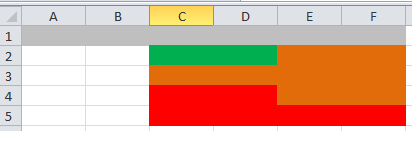
sheets. Each sheet should contain cells with different background colors (like in the attachment file “Colors.png”).
I’ve extend “ExportExcel” class and I’ve overridden the method:
protected CellStyle getCellStyle(final Object rootItemId, final int row, final int col, final boolean totalsRow)
.
Taking in consideration some conditions, I’m able to set for a particular cell (at a given row and col) a specific color.
The problem is that I don’t know for what
sheet
,
getCellStyle
method is called.
getCellStyle
is called from
addDataRow
which has
sheetToAddTo
as a parameter, but it doesn’t pass it forward.
Any ideas how I can specify background colors at cell level for multiple sheets?
Indeed. If not, you get a NullPointerException when calling excelExport.export();
Hi,
In CSVExport, is there any way, where I can remove double inverted commas(“”) and use semicolon ( as delimiter instead of comma (,)?
Just released a new version after being away from the project for a while. Made a couple of updates / fixes.
-
Moved source control and issue management from google code to github (google code shut down)
-
Added functionality contributed by Marco Petris to export to CSV using the Java CSV library. This can avoid the 65,536 row limit but has no additional functionality (e.g. the output column order is alphabetic and there’s no way to override formats). See class CsvExportUsingJavaCsv. The relevant version of Java CSV (2.1) wasn’t available through Maven so just copied the two small classes of Java CSV into the project.
-
Added an example to the demo app to showcase the Java CSV capability.
-
Upgraded various versions of dependencies in the pom.
- Upgraded Vaadin version from 7.2.3 to 7.5.9
- Upgraded apache-poi from 3.10-FINAL 3.13
- Upgraded filteringtable from 0.9.8.v7 to 0.9.13.v7
- Upgraded maven compiler plugin version from 3.1 to 3.3
- Upgraded maven jar plugin from 2.3.1 to 2.6
- Upgraded Maven source plugin from 2.1.2 to 2.4
- Fixed a couple of small bugs. Made DefaultTableHolder and CustomTableHolder look for Container.Hierarchical as opposed to HierarchicalContainer (#38). Made inputstream transient to avoid serialization issues (#28).
The last issue people on the add-on page mentioned was NullPointerException with sendConvertedFileToUser(TableExport.java:92). I tried to put in a fix that may work but am not sure about it. This is kind of a deficiency in Vaadin generally. There’s no good way anymore to get the browser to offer up a resource. You have to use getPage().open(…) of UI which is deprecated. Getting the UI from a component can return null if the component isn’t actually on a page. I now do a check for null if the UI returned by the component is null and use UI.getCurrent() to hopefully get a non-null UI.