Tree
The Tree component allows a natural way to represent
data that has hierarchical relationships, such as filesystems or message
threads. The Tree component in IT Mill Toolkit works
much like the tree components of most modern desktop user interface toolkits,
for example in directory browsing.
The most prominent use of the Tree component is to use
it for displaying a hierachical menu, like the menu on the left side of the
screen for instance or to display filesystems or other hierarchical
datasets. The menu style makes the appearance of the
tree more suitable for this purpose.
final Object[][] planets = new Object[][]{
        new Object[]{"Mercury"},
        new Object[]{"Venus"},
        new Object[]{"Earth", "The Moon"},
        new Object[]{"Mars", "Phobos", "Deimos"},
        new Object[]{"Jupiter", "Io", "Europa", "Ganymedes", "Callisto"},
        new Object[]{"Saturn", "Titan", "Tethys", "Dione", "Rhea", "Iapetus"},
        new Object[]{"Uranus", "Miranda", "Ariel", "Umbriel", "Titania", "Oberon"},
        new Object[]{"Neptune", "Triton", "Proteus", "Nereid", "Larissa"}};

Tree tree = new Tree("The Planets and Major Moons");

/* Add planets as root items in the tree. */
for (int i=0; i<planets.length; i++) {
    String planet = (String) (planets[i][0]);
    tree.addItem(planet);

    if (planets[i].length == 1) {
        /* The planet has no moons so make it a leaf. */
        tree.setChildrenAllowed(planet, false);
    } else {
        /* Add children (moons) under the planets. */
        for (int j=1; j<planets[i].length; j++) {
            String moon = (String) planets[i][j];

            /* Add the item as a regular item. */
            tree.addItem(moon);

            /* Set it to be a child. */
            tree.setParent(moon, planet);

            /* Make the moons look like leaves. */
            tree.setChildrenAllowed(moon, false);
        }

        /* Expand the subtree. */
        tree.expandItemsRecursively(planet);
    }
}

main.addComponent(tree);
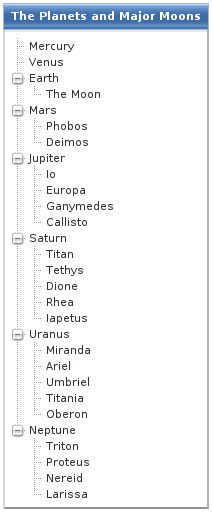
The Tree component uses
Container data sources much like the
Table component, with the addition that it also
utilizes hierarchy information maintained by a container.