|
||||||||||
| PREV PACKAGE NEXT PACKAGE | FRAMES NO FRAMES | |||||||||
See:
Description
| Interface Summary | |
|---|---|
| Button.ClickListener | Button click listener |
| Component | The top-level component interface which must be implemented by all UI components that use IT Mill Toolkit. |
| Component.ErrorListener | Listener interface for receiving Component.Errorss. |
| Component.Focusable | Interface implemented by components which can obtain input focus. |
| Component.Listener | Listener interface for receiving Component.Events. |
| ComponentContainer | Extension to the Component interface which adds to it the capacity to
contain other components. |
| ComponentContainer.ComponentAttachListener | Component attach listener interface. |
| ComponentContainer.ComponentDetachListener | Component detach listener interface. |
| Field | |
| FieldFactory | Factory for creating new Field-instances based on type, datasource and/or context. |
| Layout | Extension to the ComponentContainer interface which adds the
layouting control to the elements in the container. |
| TabSheet.SelectedTabChangeListener | Selected Tab Change Event listener |
| Tree.CollapseListener | Collapse event listener. |
| Tree.ExpandListener | Expand event listener. |
| Upload.FailedListener | Receives events when the uploads are finished, but unsuccessful. |
| Upload.FinishedListener | Receives the events when the uploads are ready. |
| Upload.Receiver | Interface that must be implemented by the upload receivers. |
| Upload.SucceededListener | Receives events when the uploads are successfully finished. |
| Window.CloseListener | |
| Class Summary | |
|---|---|
| AbstractComponent | An abstract class that defines default implementation for the
Component interface. |
| AbstractComponentContainer | Extension to AbstractComponent that defines the default
implementation for the methods in ComponentContainer. |
| AbstractField | Abstract field component for implementing buffered property editors. |
| BaseFieldFactory | Default implementation of the the following Field types are used by default: Boolean: Button(switchMode:true). |
| Button | A generic button component. |
| Component.ErrorEvent | Class of all component originated ErrorEvents. |
| Component.Event | Superclass of all component originated Events. |
| ComponentContainer.ComponentAttachEvent | Component attach event sent when a component is attached to container. |
| ComponentContainer.ComponentDetachEvent | Component detach event sent when a component is detached from container. |
| CustomComponent | Custom component provides simple implementation of Component interface for creation of new UI components by composition of existing components. |
| CustomLayout | A container component with freely designed layout and style. |
| DateField |
A date editor component that can be bound to any bindable Property. that is
compatible with java.util.Date. |
| Embedded | Component for embedding external objects. |
| ExpandLayout | Our layouts (except custom layout of course) don't currently work at all with relative widths. |
| Field.ValueChangeEvent | An Event object specifying the Field whose value has been
changed. |
| Form | Form component provides easy way of creating and managing sets fields. |
| FrameWindow | An application frame window component. |
| GridLayout | A container that consists of components with certain coordinates on a grid. |
| Label | Label component for showing non-editable short texts. |
| Link | Link is used to create external or internal URL links. |
| OrderedLayout | Ordered layout. |
| Panel | Panel - a simple single component container. |
| ProgressIndicator | ProgressIndicator is component that shows user state of a
process (like long computing or file upload)
ProgressIndicator has two mainmodes. |
| Select | A class representing a selection of items the user has selected in a UI. |
| Table | TableComponent is used for representing data or components in
pageable and selectable table. |
| TabSheet | Tabsheet component. |
| TextField | A text editor component that can be bound to any bindable Property. |
| Tree | MenuTree component. |
| Upload | Component for client file uploading. |
| Window | Application window component. |
| Exception Summary |
|---|
Provides interfaces and classes in the IT Mill Toolkit.
Interface hierarchy
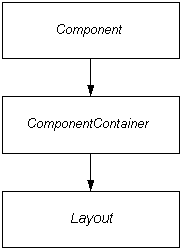
The general interface hierarchy looks like this:
Note that the above picture includes only the main interfaces. This package includes several other lesser subinterfaces which are not significant in this scope. The interfaces not appearing here are documented with the classes that define them.
The {@link com.itmill.toolkit.ui.Button} for
example won't need to implement the lower level interfaces described
below. Note that the classes and interfaces required by the component event
framework are defined in Component.
The next level in the component hierarchy are the classes implementing
the ComponentContainer interface. It adds the
capacity to contain other components to
Component with a simple API.
The third and last level is the Layout,
which adds the concept of location to the components contained in a
ComponentContainer. It can be used to create
containers whose contents can be positioned arbitrarily.
Component class hierarchy
The actual component classes form a hierarchy like this:

At the top level is AbstractComponent
which implements the Component interface. As
the name suggests it is abstract, but it does include a default
implementation for all methods defined in Component so that
a component is free to override only those functionalities it needs.
As seen in the picture, AbstractComponent serves as the
superclass for several "real" components, but it also has a some abstract
extensions. AbstractComponentContainer serves
as the root class for all components (for example, panels and windows) who
can contain other components. AbstractField,
on the other hand, implements several interfaces to provide a base class for
components that are used for data display and manipulation.
|
||||||||||
| PREV PACKAGE NEXT PACKAGE | FRAMES NO FRAMES | |||||||||