3.5. Events and Listeners
Vaadin offers an event-driven programming model for handling user interaction. When a user does something in the user interface, such as clicks a button or selects an item, the application needs to know about it. Many Java-based user interface frameworks follow the Event-Listener pattern (also known as the Observer design pattern) to communicate user input to the application logic. So does Vaadin. The design pattern involves two kinds of elements: an object that generates ("fires" or "emits") events and a number of listeners that listen for the events. When such an event occurs, the object sends a notification about it to all the listeners. In a typical case, there is only one listener.
Events can serve many kinds of purposes. In Vaadin, the usual purpose of events is handling user interaction in a user interface. Session management can require special events, such as for time-out, in which case the event would actually be the lack of user interaction. Time-out is a special case of timed or scheduled events, where an event occurs at a specific date and time or when a set time has passed. Database and other asynchronous communications can cause events as well.
To receive events of a particular type, an application must register a
listener object with the event source. The listeners are registered in the
components with the addListener() method. The method
has a generic version defined at the level of
AbstractComponent, the base class of all components.
Most components that have related events define their own event class and
corresponding listener classes. For example, the Button
has Button.ClickEvent events, which can be listened to
through the Button.ClickListener interface.
In the following, we handle button clicks with a listener implemented as an anonymous class:
final Button button = new Button("Push it!");

button.addListener(new Button.ClickListener() {
    public void buttonClick(ClickEvent event) {
        button.setCaption("You pushed it!");
    }
});
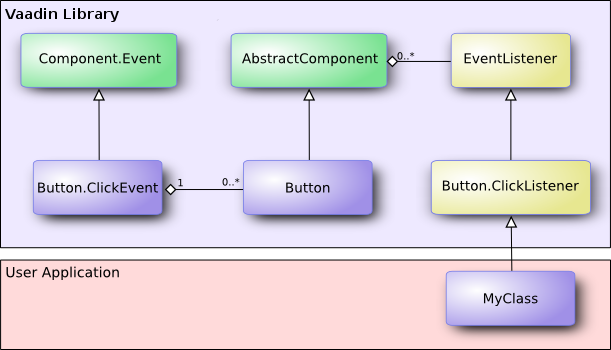
Figure 3.3, “Class Diagram of a Button Click Listener” illustrates the case where an
application-specific class inherits the
Button.ClickListener interface to be able to listen for
button click events. The application must instantiate the listener class and
register it with addListener(). When an event occurs,
an event object is instantiated, in this case a
ClickEvent. The event object knows the related UI
component, in this case the Button.
In the ancient times of C programming, callback functions
filled largely the same need as listeners do now. In object-oriented
languages, we have only classes and methods, not functions, so the application
has to give a class interface instead of a callback function pointer to the
framework. However, Vaadin supports defining a method as a listener as well,
using the MethodListener wrapper.
Notice that many listener interfaces inherit the
java.util.EventListener superinterface, but it
is not generally necessary to inherit it.
Section 4.4, “Handling Events with Listeners” goes into details of handling events in practice.