Label
Label is a text component that can be used to
display non-editable text. By default, the text is plain text, but
can be formatted depending on the content mode. The text will wrap
around if the width of the containing component limits the length of
lines, except for the preformatted text.
The content mode can be set in the constructor or with the
setContentMode() method, and can have the
following values:
Table 4.1. Content Modes for Label
CONTENT_DEFAULT |
The default content mode is
CONTENT_TEXT (see below).
|
CONTENT_PREFORMATTED |
Content mode, where the label contains preformatted
text. It will be, by default, rendered with a
fixed-width typewriter font. Preformatted text can
contain line breaks, written in Java with the
\n escape sequence for a newline
character (ASCII 0x0a), or tabulator characters
written with \t (ASCII 0x08).
|
CONTENT_RAW | Content mode, where the label contains raw text. Output is not required to be valid XML. It can be, for example, HTML, which can be unbalanced or otherwise invalid XML. The example below uses the <br> tag in HTML. While XHTML should be preferred in most cases, this can be useful for some specific purposes where you may need to display loosely formatted HTML content. The raw mode also preserves character entities, some of which might otherwise be interpreted incorrectly. |
CONTENT_TEXT |
Content mode, where the label contains only plain
text. All characters are allowed, including the
special <,
>, and &
characters in XML or HTML, which are quoted properly
in XHTML while rendering the component. This is the
default mode.
|
CONTENT_UIDL | Formatted content mode, where the contents are XML that is restricted to UIDL 1.0, the internal language of IT Mill Toolkit for AJAX communications between the server and the browser. Obsolete since IT Mill Toolkit 5.0. |
CONTENT_XHTML |
Content mode, where the label contains XHTML. The
content will be enclosed in a DIV element having
namespace
"http://www.w3.org/TR/xhtml1/DTD/xhtml1-strict.dtd".
|
CONTENT_XML | Content mode, where the label contains well-formed and well-balanced XML. Each of the root elements must have their default namespace specified. |
Warning
Notice that the validity of XML or XHTML in a Label is not checked in the server during rendering of the component and any errors can result in an UIDL error in the browser! You should validate the content before displaying it in the component, especially if it comes from an uncertain source.
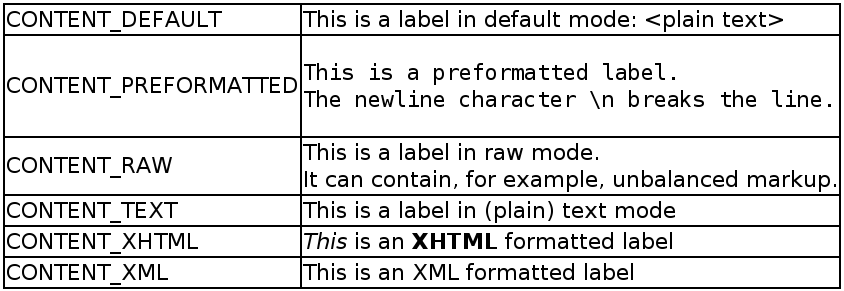
The following example demonstrates use of
Label in different modes.
GridLayout labelgrid = new GridLayout (2,1);
labelgrid.addComponent (new Label ("CONTENT_DEFAULT"));
labelgrid.addComponent (new Label ("This is a label in default mode: <plain text>", Label.CONTENT_DEFAULT));
labelgrid.addComponent (new Label ("CONTENT_PREFORMATTED"));
labelgrid.addComponent (new Label ("This is a preformatted label.\nThe newline character \\n breaks the line.", Label.CONTENT_PREFORMATTED));
labelgrid.addComponent (new Label ("CONTENT_RAW"));
labelgrid.addComponent (new Label ("This is a label in raw mode.<br>It can contain, for example, unbalanced markup.", Label.CONTENT_RAW));
labelgrid.addComponent (new Label ("CONTENT_TEXT"));
labelgrid.addComponent (new Label ("This is a label in (plain) text mode", Label.CONTENT_TEXT));
labelgrid.addComponent (new Label ("CONTENT_XHTML"));
labelgrid.addComponent (new Label ("<i>This</i> is an <b>XHTML</b> formatted label", Label.CONTENT_XHTML));
labelgrid.addComponent (new Label ("CONTENT_XML"));
labelgrid.addComponent (new Label ("This is an <myelement>XML</myelement> formatted label", Label.CONTENT_XML));
main.addComponent(labelgrid);
The rendering will look as follows:
Using the XHTML, XML, or raw modes allow inclusion of, for example, images within the text flow, which is not possible with any regular layout components. The following example includes an image within the text flow, with the image coming from a class loader resource.
ClassResource labelimage = new ClassResource ("labelimage.jpg", this);
main.addComponent(new Label("Here we have an image <img src=\""
                            + this.getRelativeLocation(labelimage) + "\"/> within text.",
                            Label.CONTENT_XHTML));
When using a class loader resource, the image has to be included in
the JAR of the web application. In this case, the
labelimage.jpg needs to be in the default
package. When rendered in web browser, the output will look as
follows:

Another solution would be to use the
CustomLayout component, where you can write
the component content as an XHTML fragment in a theme, but such a
solution may be too heavy for most cases, and not flexible enough if
the content needs to be dynamically generated.
Notice that rendering of XHTML depends on the assumption that the client software and the terminal adapter are XHTML based. It is possible to write a terminal adapter for a custom thin client application, which may not be able to render XHTML at all. There are also differences between web browsers in their support of XHTML.